
For most self-learners, the best kanji apps combine a spaced repetition system (SRS) with context-driven vocabulary and, ideally, writing practice. Use one primary app for daily SRS reviews and one secondary tool for handwriting or reading. That pairing covers the two biggest gaps in solo study: retention and real-world recognition.
Here is the shortlist at a glance:
- WaniKani — SRS plus mnemonics, best for beginners who want a fully guided path
- Kanji Study — vocabulary-first with stroke detection, best for learners who want writing practice alongside reading
- Anki — flexible SRS with community decks, best for self-directed learners who want total control
- Remembering the Kanji (RTK) — mnemonic-only method, best for building a visual framework before tackling readings
- Kodansha Kanji Learner’s Course (KLC) — textbook-style with vocabulary context, best for JLPT-focused study
- KanjiDamage — free, irreverent mnemonic system, best for learners who find standard mnemonics dry
- Koohii — community mnemonic hub for RTK users, best as a free companion to RTK or KanjiDamage
| App / Program | Best for | Teaching method | Pricing model |
|---|---|---|---|
| WaniKani | Structured beginners | SRS + mnemonics | Subscription / free trial |
| Kanji Study | Writing-focused learners | Vocabulary-first + SRS | Free tier + one-time upgrade |
| Anki | Self-directed learners | Customizable SRS | Free (desktop) / paid iOS |
| RTK | Visual framework builders | Mnemonic-only | One-time book purchase |
| KLC | JLPT / reading-focused | Vocabulary in context | One-time book purchase |
| KanjiDamage | Budget learners | Mnemonic + Anki deck | Free |
| Koohii | RTK companions | Community mnemonics | Free |
Key Takeaways
The most effective kanji study pairs a daily SRS app with one contextual tool, whether that is a handwriting app, graded readers, or a structured class, because recognition alone does not produce reading fluency or writing ability.
| Point | Details |
|---|---|
| Match method to goal | Choose SRS plus mnemonics for beginners, vocabulary-first for reading, handwriting tools for writing goals. |
| Control your review queue | Cap new items at 5–10 per day and clear reviews before adding lessons to prevent burnout. |
| Add context early | Pair flashcard apps with graded readers or real-world reading from week 6 onward to transfer recognition to fluency. |
| Use textbooks for JLPT | KLC plus Anki aligns directly with JLPT vocabulary and is the most efficient route for exam preparation. |
| Japanese Explorer classes | Structured online and small-group classes fill the pronunciation, grammar, and conversation gaps that apps leave open. |
Table of Contents
- How do you choose the right kanji app for your goals?
- Which kanji apps and programs are worth your time?
- What does a practical 8-week kanji starter plan look like?
- What do teachers and experienced learners actually recommend?
- When is an app not enough?
- The approach I actually recommend
- Teacher-led classes fill the gaps apps leave open
- Sources
- FAQ
How do you choose the right kanji app for your goals?
The single biggest mistake learners make is picking an app based on popularity rather than method fit. Tofugu’s guide to kanji learning programs puts it plainly: success depends on matching the program’s structure to your learning preference and finding a rhythm that prevents burnout. Popularity does not equal compatibility.
Start with these decision criteria before you download anything:
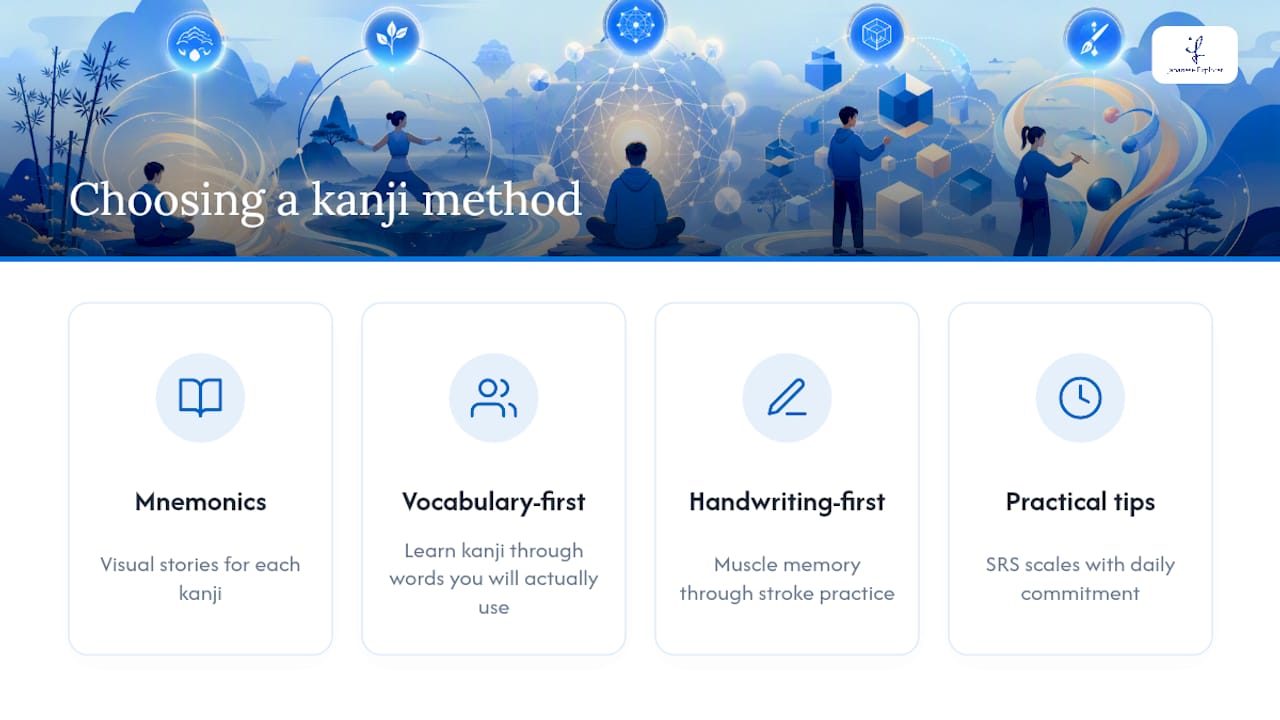
Teaching method. Do you want mnemonics (visual stories for each kanji), vocabulary-first (learn kanji through words you will actually use), or handwriting-first (muscle memory through stroke practice)? Each method produces different results at different speeds.
Your goal. JLPT preparation demands coverage of specific kanji lists. Reading fluency rewards vocabulary-first methods. Handwriting goals need stroke-order detection, not just flashcards.
Time available. SRS apps like WaniKani and Anki scale with daily commitment. Miss a week and the review queue grows fast. If your schedule is unpredictable, choose an app with adaptive SRS scheduling that softens the penalty for missed days.
Platform and offline access. Commuters need offline mode. Desktop-only tools like Anki’s free version work well at home but less so on the go.
Cost. Free tools like KanjiDamage, Koohii, and Anki (desktop) cover a lot of ground. Paid tools like WaniKani and Kanji Study’s full unlock add structure and polish.
Customizability. If you want to add your own vocabulary or reorder lessons, Anki wins. If you prefer a curated path, WaniKani or Kanji Study suits you better.
Quick self-evaluation checklist
Before committing to an app, answer these:
- Do I want the app to decide what I study, or do I want to set my own order?
- Am I preparing for a specific JLPT level, or studying for general literacy?
- Do I need to write kanji by hand, or is reading recognition my priority?
- Can I study at least 15 minutes every day, or do I need a forgiving schedule?
- Do I prefer a one-time cost or a monthly subscription?
Red flags to watch for
- Punishing SRS backlogs. Apps that pile up hundreds of overdue reviews after a few missed days kill motivation fast.
- Paid-only essential features. A free tier that locks stroke detection or JLPT filtering behind a paywall without warning.
- No offline support. If you lose your connection mid-commute, your study session should not collapse.
Pro Tip: Set a conservative daily new-item limit when you start, even if the app allows more. Adding 5–10 new kanji per day rather than 20 keeps your review queue manageable for months.
Which kanji apps and programs are worth your time?
Every app below earned its place for a specific reason. The goal is not to use all of them — it is to find the one or two that match how you learn.
WaniKani
WaniKani teaches kanji and vocabulary through a three-layer system: radicals first, then kanji built from those radicals, then vocabulary that uses those kanji. Every item comes with a mnemonic story for both the meaning and the reading, and a built-in SRS schedules reviews at increasing intervals to lock them into long-term memory.
The structure is deliberately rigid. You cannot skip ahead or reorder lessons, which frustrates some learners but protects others from overloading. Coverage runs to roughly two thousand kanji and six thousand vocabulary items across multiple levels.
Best for: Beginners who want a fully guided path and do not want to configure anything.
Platform: Web, iOS, Android.
Pricing: Free for the first three levels; subscription required beyond that.
Writing support: None built in. Pair with a handwriting app separately.
Learning curve: Slow start (levels 1–10 feel easy), then accelerates significantly.
Short daily routine: Complete your SRS review queue first thing, then unlock new lessons only after reviews are clear. Cap new lessons at 10 per session.
Pros: Polished UX, strong community, mnemonics are memorable.
Cons: Subscription cost adds up; no handwriting practice; rigid ordering.
Kanji Study
Kanji Study takes a vocabulary-first approach, teaching kanji through the words they appear in rather than in isolation. Stroke animations show correct stroke order, and the writing detection feature grades your handwriting in real time. JLPT N5 through N1 levels are covered, and the Android version adds offline search across roughly 6,000 kanji plus SRS flashcards and writing challenges.
The free beginner tier covers N5 kanji. A one-time in-app purchase unlocks all levels, which is a better long-term value than a monthly subscription if you plan to study past N4.
Best for: Learners who want handwriting practice alongside reading, and anyone who prefers a one-time payment.
Platform: iOS, Android; offline capable.
Pricing: Free (N5 tier) + one-time upgrade for full access.
Writing support: Stroke animations and real-time handwriting detection.
Learning curve: Gentle. The interface is clean and the vocabulary-first method feels natural.
Short daily routine: Review SRS flashcards for 10 minutes, then do one writing challenge set. Use the quick-search feature to look up kanji you encounter in reading.
Pros: Excellent writing tools, offline access, fair pricing, JLPT-aligned levels.
Cons: Vocabulary-first means readings come before meaning depth; mnemonics are minimal.
Anki
Anki is not a kanji app in the traditional sense. It is a powerful, open-source SRS platform that runs on community-built decks. The quality of your experience depends almost entirely on which deck you choose and how consistently you maintain it. The most popular kanji decks follow RTK order, Core 2k/6k vocabulary lists, or JLPT-structured sets.
The desktop version is free. The iOS app costs a one-time fee; Android is free. Because you configure everything yourself, Anki rewards disciplined learners and frustrates casual ones.
Best for: Self-directed learners who want total control over content, order, and card format.
Platform: Web, iOS (paid), Android (free), desktop (free); offline capable.
Pricing: Free on most platforms; one-time fee for iOS.
Writing support: Depends on the deck. Some decks include stroke-order diagrams; none offer live detection.
Learning curve: High setup cost, then very efficient once running.
Short daily routine: Review your due cards before adding new ones. Keep new cards per day at 10–15 until your daily review count stabilizes below 100.
Pros: Free, endlessly customizable, massive deck library, works offline.
Cons: No guided path, deck quality varies, setup takes real time.
Remembering the Kanji (RTK)
RTK is a textbook by James Heisig, not an app, but it anchors one of the most popular kanji-learning methods in the world. The method teaches all 2,200+ jōyō kanji using English keyword mnemonics and invented stories, deliberately ignoring readings until a second volume. The idea is to build a solid visual framework first.
RTK works best when paired with a digital SRS. Most learners use Anki with an RTK-order deck, and the Koohii community at Kanji provides crowd-sourced mnemonic stories for every kanji in the book, which saves enormous time.
Best for: Learners who struggle to distinguish kanji visually and want a pure meaning-first foundation.
Platform: Physical book + Anki or Koohii for SRS.
Pricing: One-time book purchase; Koohii and Anki are free.
Writing support: The book includes stroke order; digital practice depends on your SRS setup.
Learning curve: Moderate. The method is simple, but the payoff (readings) comes later.
Short daily routine: Study 10–20 new RTK entries from the book, create Anki cards or use a pre-built RTK deck, and check Koohii for community stories on any kanji that does not stick.
Pros: Builds strong visual recognition fast, community support on Koohii is excellent.
Cons: Readings are not taught until Volume 2; requires separate SRS setup.
Kodansha Kanji Learner’s Course (KLC)
KLC is a textbook by Andrew Scott Conning that teaches 2,300 kanji in a frequency-and-vocabulary-driven order. Unlike RTK, it teaches both meanings and readings from the start, using vocabulary examples to anchor each kanji in real usage. It aligns well with JLPT preparation because the vocabulary examples reflect common exam words.
Like RTK, KLC is a book that pairs with Anki. Pre-built KLC Anki decks are available in the shared deck library, which makes the digital side easy to set up.
Best for: JLPT-focused learners and anyone who finds RTK’s meaning-only approach too abstract.
Platform: Physical book + Anki.
Pricing: One-time book purchase; Anki is free.
Writing support: Stroke order included in the book.
Learning curve: Moderate to high. More information per kanji than RTK, so progress feels slower initially.
Short daily routine: Study 5–10 new KLC entries, review vocabulary examples aloud, then run Anki reviews for the day’s new and due cards.
Pros: Readings and meanings together, strong JLPT alignment, vocabulary-rich.
Cons: Denser than RTK per entry; no app version.
KanjiDamage
KanjiDamage is a free web resource that teaches roughly 1,700 kanji using deliberately irreverent, often absurd mnemonics. It has its own ordering system built around component radicals, and a pre-built Anki deck is available for download. The humor is polarizing, but learners who click with the style often find it far more memorable than dry academic mnemonics.
Best for: Budget learners and anyone who finds standard mnemonic systems boring.
Platform: Web + Anki.
Pricing: Free.
Writing support: None built in.
Learning curve: Low entry barrier; the humor either works for you or it does not.
Short daily routine: Read 5–10 new KanjiDamage entries on the site, then review the corresponding Anki cards.
Pros: Completely free, memorable mnemonics, good radical-based ordering.
Cons: Covers fewer kanji than RTK or KLC; no readings depth; requires Anki setup.
Koohii
Koohii is a community platform built specifically for RTK learners. It hosts thousands of user-submitted mnemonic stories for every kanji in Heisig’s book, ranked by community votes. You can browse the top stories for any kanji, save your favorites, and discuss them with other learners. It also includes a built-in SRS for RTK-order review.
Koohii is not a standalone learning tool. It is a companion that makes RTK dramatically more effective by crowdsourcing the hardest part: inventing memorable stories.
Best for: RTK users who want community-sourced mnemonics and a free built-in SRS.
Platform: Web.
Pricing: Free.
Writing support: None.
Learning curve: Minimal. Browse, pick a story, review.
Pros: Free, community-driven, excellent mnemonic quality for popular kanji.
Cons: Only useful alongside RTK; no vocabulary or readings.
Feature comparison
What does a practical 8-week kanji starter plan look like?
A plan that works is one you can actually follow on a Tuesday after a long day. Here is a realistic 8-week structure built around one primary app and one secondary tool.
Weeks 1–2: Setup and baseline
- Pick your primary app based on the checklist above. If you are a complete beginner, start with WaniKani or Kanji Study. If you are comfortable configuring tools, start with Anki plus an RTK or KLC deck.
- Set your daily new-item limit conservatively: 5–10 new kanji per day maximum.
- Establish your study window. Even 15 minutes at the same time each day beats 90 minutes once a week.
- Choose a secondary tool: a handwriting app like Ringotan (which covers all 2,100 jōyō and 800 jinmeiyō kanji with stroke-order SRS) for writing practice, or graded readers for reading practice.
- Do not start both tools at full intensity. Week 1 is for the primary app only.
Weeks 3–5: Build the habit
- Daily SRS reviews first. Clear your review queue before adding new lessons. This is the rule that prevents backlogs.
- New lessons second. Add new kanji only after reviews are done.
- Secondary tool three times a week. Handwriting practice or 10 minutes of graded reading.
- Track your streak. Consistency matters more than volume at this stage.
Weeks 6–8: Deepen and contextualize
- Increase new lessons slightly if your review queue stays under 100 items per day.
- Add one real-world reading activity per week: a manga page, a news headline, or a short graded reader passage. Recognizing kanji in context is a different skill from recognizing them in flashcards.
- Review your kanji memorization techniques to refresh any items that keep failing.
- If you are preparing for JLPT, cross-check your current kanji coverage against the target level’s list and prioritize gaps.
Daily time targets
| Study window | SRS reviews | New lessons | Secondary tool |
|---|---|---|---|
| 15 minutes | 10–15 cards | 3–5 kanji | Skip |
| 10 minutes | 10–20 new entries | 5–10 kanji | 5 min handwriting |
| 10–15 minutes | 5–10 new entries | 10–15 kanji | 15 min reading |
Troubleshooting common problems
- Review backlog. Stop adding new items immediately. Clear the backlog over several days before resuming lessons. Consider enabling adaptive scheduling if your app supports it.
- Burnout. Drop to a 15-minute window for two weeks. Reducing intensity is better than quitting entirely.
- Plateau. If kanji are not transferring to reading, shift more time to graded readers and less to flashcard drills. Recognition in isolation and recognition in text are trained differently.
What do teachers and experienced learners actually recommend?
The most consistent advice from experienced Japanese instructors is this: SRS alone builds recognition, but it does not build reading fluency or writing ability. Those skills need context.
Balancing SRS review with contextual reading and handwriting practice produces faster transfer to real-world use than SRS alone. Apps that integrate daily stories or graded reading sets alongside flashcards help learners connect kanji to meaning in natural sentences, not just isolated recall.
This is why modern apps are moving toward all-in-one models. Kaeru, for example, pairs adaptive SRS scheduling with integrated daily stories to contextualize kanji and grammar together, reducing the gap between flashcard recall and actual reading comprehension. The adaptive scheduling also addresses the single most demotivating issue in SRS study: the punishing backlog that builds up after a few missed days.
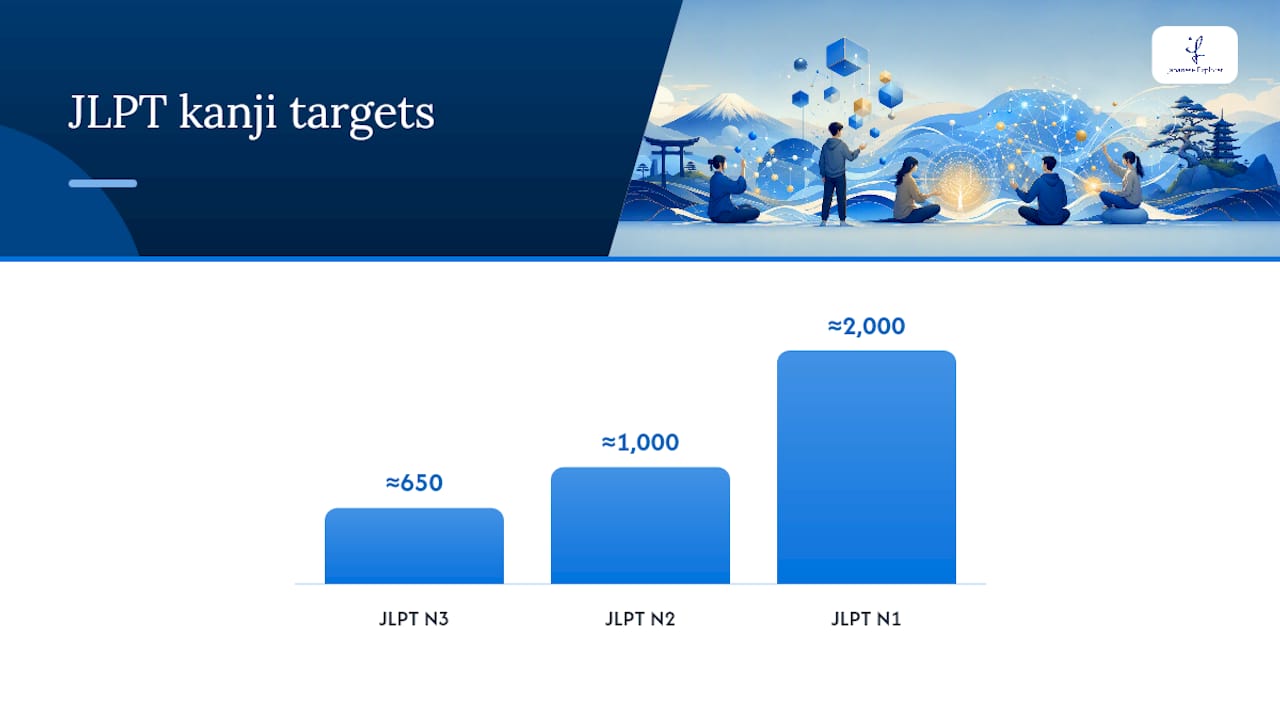
Teachers who work with adult learners preparing for JLPT consistently recommend aligning your app’s content scope with the jōyō kanji list and the target JLPT level. N3 requires roughly 650 kanji; N2 requires around 1,000; N1 demands close to 2,000. Knowing your target number helps you pace your app study and avoid over-investing in kanji outside your exam scope.
Pronunciation and spoken usage are the two areas apps handle least well. Reading a kanji correctly in a flashcard does not mean you can use it naturally in conversation. That gap is where teacher feedback becomes genuinely useful, not just nice to have.
Pro Tip: If your SRS review count climbs above 150 items per day, pause new lessons entirely. A sustainable queue of 50–100 reviews per day is more effective long-term than a heroic 200-card sprint that leads to burnout.
For learners who want to take their study outside the classroom, pairing app-based SRS with real-world input, such as reading product labels, menus, or social media in Japanese, accelerates recognition in a way that pure flashcard study cannot replicate.
On pronunciation specifically, it is worth noting that structured pronunciation training addresses depth that most kanji and vocabulary apps simply do not cover, particularly pitch accent patterns that affect how words are understood by native speakers.
When is an app not enough?
Apps are excellent for building recognition and recall. They are less effective for developing writing fluency, natural sentence usage, and spoken production. Here is where to add other resources:
- RTK (Remembering the Kanji) textbook. Use it when you want a pure visual framework before tackling readings. Pair with Koohii for community mnemonics and Anki for SRS. Best for learners who find kanji blur together visually.
- Kodansha Kanji Learner’s Course (KLC). Use it when JLPT preparation is the goal and you want vocabulary context built in from day one. Pair with a pre-built KLC Anki deck.
- Graded readers. Use them from N5 level onward to transfer flashcard recognition to actual reading. The Tadoku graded reader series is widely used and freely available in part online.
- Handwriting practice tools. Ringotan covers the full jōyō and jinmeiyō sets with stroke-order SRS. Kanji Study’s writing detection is strong for mobile practice. For deeper guidance on writing Japanese characters, structured drills matter more than casual tracing.
- Private lessons or small-group classes. Use them when you need real-time feedback on pronunciation, writing accuracy, and natural usage. A tutor can identify the specific kanji or readings you keep confusing and address them directly in a way no algorithm can.
For JLPT preparation specifically, the most effective pairing is an SRS app for daily recall plus a structured course or tutor for grammar, reading comprehension, and listening practice. The kanji knowledge an app builds is necessary but not sufficient for passing N3 and above.
For general literacy, graded readers plus an SRS app cover most ground. For handwriting goals, add a stroke-detection app or a tutor who can correct your form in real time.
The approach I actually recommend
If you are a complete beginner, start with WaniKani or Kanji Study as your primary app and add Ringotan for handwriting three times a week. The structure keeps you moving and the writing practice prevents the common problem of recognizing kanji you cannot reproduce.
If you are preparing for JLPT N3 or above, KLC paired with Anki is the most efficient route because the vocabulary context maps directly to exam content. Add a structured course for grammar and listening.
If you are a self-directed learner who wants maximum flexibility, Anki with an RTK or KLC deck plus Koohii for mnemonics gives you the most control. The setup cost is real, but the long-term efficiency is hard to beat.
Three learner archetypes and their best match:
- The structured beginner. Primary: WaniKani. Secondary: Ringotan for handwriting. Expect noticeable reading progress in 3–4 months of consistent daily study.
- The JLPT candidate. Primary: KLC + Anki. Secondary: graded readers and a structured course for grammar. Align your kanji targets with the specific level’s list.
- The reading-focused learner. Primary: Kanji Study (vocabulary-first). Secondary: graded readers from N5 upward. Writing practice is optional unless the goal includes handwriting.
When to switch strategy: if you have been studying consistently for three months and kanji are not transferring to reading, shift your secondary tool from flashcards to graded readers. Stagnation in recognition usually means you need more context, not more repetition.
Teacher-led classes fill the gaps apps leave open
Apps do a lot. They do not do everything. Real-time feedback on pronunciation, natural sentence usage, and the confidence that comes from actual conversation practice are things no flashcard system delivers on its own.
Japanese Explorer offers online Japanese courses and small-group classes taught by certified bilingual instructors, structured around the Association for Japanese-Language Teaching curriculum. If you are building kanji knowledge through an app and want a teacher to connect that knowledge to real conversation and grammar, an online group class is the natural next step. For learners focused on business Japanese or professional writing, private lessons offer targeted feedback that no algorithm can replicate.
Classes are available online via Zoom, so you can pair them with your existing app routine without changing your schedule. Whether you are working toward JLPT or building practical communication skills for work, a structured class gives your app-based study a direction and a deadline. Check the current course schedule and enroll in a class that fits your level and goals.
Sources
The resources below are worth bookmarking as you build your study plan:
- The Best Kanji Learning Programs
- Kanji Study – Learn Japanese! App – App Store
- Japanese Kanji Study – 漢字学習 – Apps on Google Play
- WaniKani
FAQ
What is the best app for practicing kanji?
For most learners, WaniKani is the best structured option for beginners, while Kanji Study suits those who want handwriting practice alongside reading. The right choice depends on your goal: SRS plus mnemonics for recognition, stroke detection for writing.
Is 20 kanji a day too much?
For most learners, 20 new kanji per day is sustainable only if your review queue stays manageable. Starting with 5–10 per day is safer; a backlog of hundreds of overdue reviews is the most common reason learners quit SRS apps.
Is WaniKani worth the money?
WaniKani is worth the subscription cost if you want a fully guided, mnemonic-driven path with no configuration required. If you are comfortable building your own Anki deck, the free Anki plus KanjiDamage or RTK route covers similar ground at no cost.
Can Duolingo teach kanji?
Duolingo introduces some kanji in context, but its coverage is limited and not aligned with JLPT or jōyō lists. For serious kanji study, a dedicated app like WaniKani, Kanji Study, or Anki with a structured deck produces far better results.